Duplicating
Tour copied successfully!

Places (POIs) visited during this tour

Place #1
Distance: 0.00mi , Attraction : Park (Recommended selfie spot).
Map Pin
W Shoreway & w 73rd St on-Ramp, Cleveland, OH 44102, USA
POI 1 Tour Image
Edgewater Park
welcome to Edgewater Park, Cleveland’s crown jewel along the Lake Erie shoreline. Spanning more than 140 acres, this park offers the best mix of city skyline views, sandy beaches, and wide-open green space. It’s where Cleveland comes to relax, play, and show off its lakeside spirit.

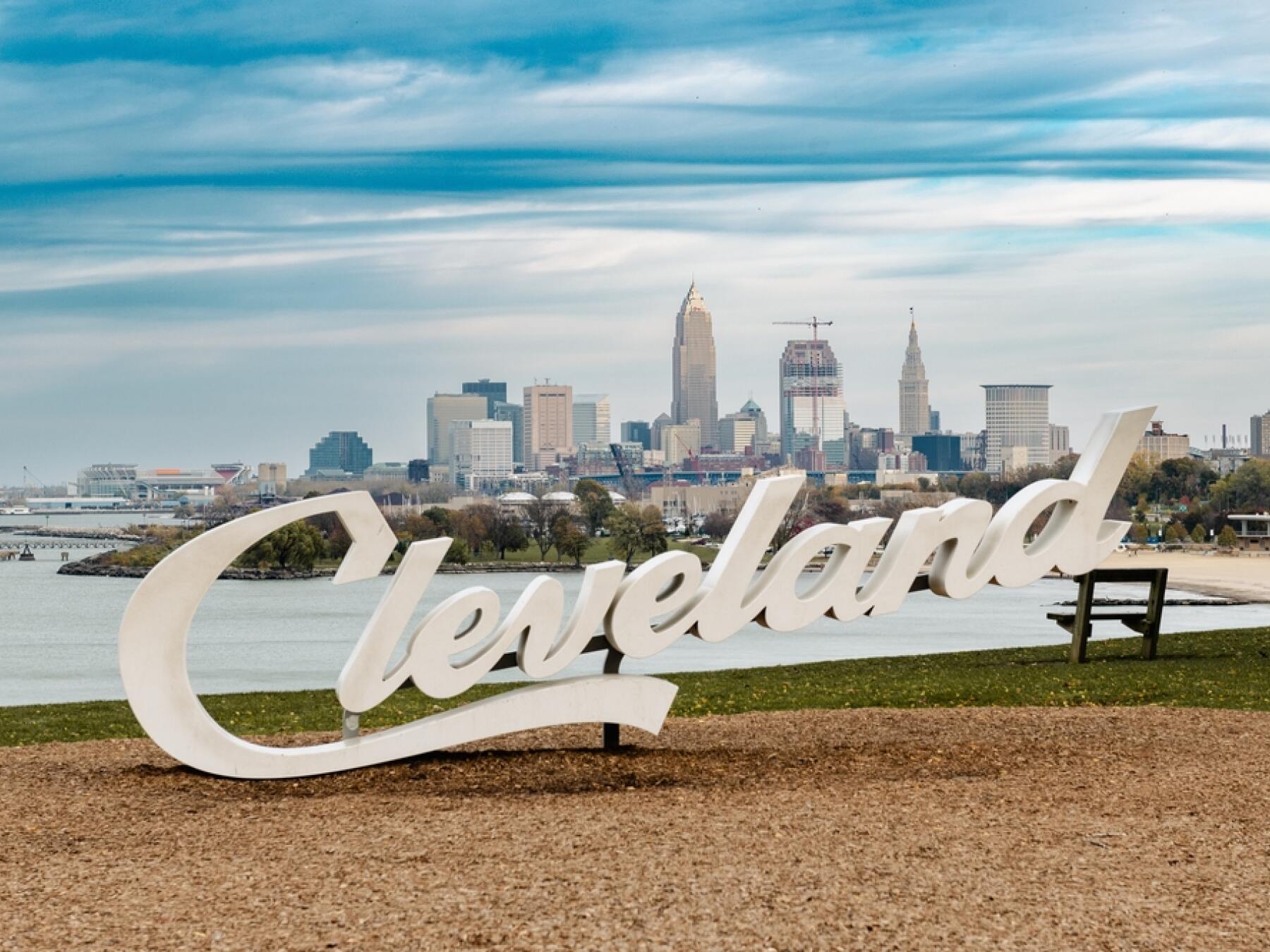
Edgewater has been a favorite gathering spot since the late 1800s, but recent revitalizations have really made it shine. You’ll find a mile-long beach perfect for swimming or soaking up the sun, fishing piers, picnic areas, and even a dog beach for your four-legged co-pilots. And don’t miss the Cleveland Script Sign perched above the shore—it’s one of the city’s most Instagram-worthy photo ops, with the downtown skyline rising in the distance.

The park is also a hub for events, from summer concerts and food truck rallies to family-friendly festivals. Locals love to grab a bite at the Edgewater Beach House, sip a cold drink, and watch the sunset over the lake. On a clear evening, the horizon feels endless, a reminder that Cleveland isn’t just an industrial city—it’s also a lakeside escape.

  https://www.clevelandmetroparks.com/parks/visit/parks/edgewater-park
Place #2
Distance: 0.80mi , Attraction : Landmark (Recommended selfie spot).
Map Pin
1 Upper Edgewater Dr, Cleveland, OH 44102, USA
POI 2 Tour Image
Cleveland Script Sign – Edgewater Park
Right at the edge of the water at Edgewater Park you can find one of Cleveland’s most iconic photo ops! The Cleveland Script Sign. The sign has become the city’s unofficial selfie spot.

Installed in 2016 as part of a series of signs placed around town, this bold white script spells out the city’s name in a sleek, modern font. But what really makes this one special is the backdrop—Lake Erie stretching out to the horizon, with the Cleveland skyline rising proudly in the distance. Whether it’s sunrise, sunset, or a clear summer afternoon, the view here never disappoints.

The sign has quickly become a symbol of civic pride and a must-stop for visitors. Locals bring friends here, couples snap engagement photos, and tourists line up for that perfect shot to prove they’ve been to the “Land.”

So go ahead, find parking and strike your best pose—the Cleveland Script Sign at Edgewater Park is the kind of stop that turns a great tour into a memorable one.

  https://www.destinationcleveland.com/things-to-do/attractions/cleveland-script-signs
Tour itinerary stops | Additional places you'll see on this self-guided tour

Map Pin Place 1 Edgewater Park
Map Pin Place 2 Cleveland Script Sign – Edgewater Park
Map Pin Place 3 Historic West Side Market
Map Pin Place 4 Cuyahoga River
Map Pin Place 5 Huntington Bank Field (Home of the Cleveland Browns)
Map Pin Place 6 Great Lakes Science Center
Map Pin Place 7 Rock & Roll Hall of Fame
Map Pin Place 8 Willard Park
Map Pin Place 9 Old Stone Church
Map Pin Place 10 Public Square & Soldiers' Monument
Map Pin Place 11 East 4th Street
Map Pin Place 12 Playhouse Square
Map Pin Place 13 Cleveland – The City of the Rock and Roll Spirit
Map Pin Place 14 Cleveland Museum of Natural History
Map Pin Place 15 Cleveland Botanical Garden
Map Pin Place 16 Cleveland Botanical Garden
Map Pin Place 17 Severance Music Center & Case Western Reserve University
Map Pin Place 18 Little Italy
Map Pin Place 19 Lake View Cemetery
Map Pin Place 20 Wade Memorial Chapel


This is a premium tour, click below for complete access!

 
How to take a UCPlaces tour
Taking a UCPlaces tour is fun and easy.
Download the app (Android or iOS), purchase the tour (either here on the website, or from within the app).
That's it, you're ready to go!
When you want to start the tour, find the tour in the app (via a quick in-app search or by clicking the tour link received in your confirmation email) and click "Start Tour" (headphones recommended for best experience.)
* After purchasing a tour you will receive a purchase confirmation email including the tour link and instructions on how to take the tour, so you don't have to remember anything now.
How does the tour work?
UCPlaces acts as your personal tour guide, providing self-guided audio tours fully navigated within our app using GPS-based navigation. You won't need to switch between external navigation apps.
Whenever you approach a point of interest (POI) on the tour, our app will automatically play the relevant audio story at the right time and place.
If you start the tour before reaching the first POI, the app will navigate you to the starting point and then begin the tour.
How is this more convenient than a traditional tour?
UCPlaces offers an innovative and flexible way to explore exciting destinations on your terms.
Here are some key advantages over traditional tours:
  • No need to commit upfront or purchase in advance; buy a tour only when you're ready to go.
  • Walk at your own pace.
  • No waiting for groups; go on your schedule.
  • Take the tour in your preferred language.
  • Start, stop and continue the tour whenever you want.
  • Returning to the same destination? Take the tour again, and again, and again... And bring a friend!
  • Enjoy preferred prices.

What's included?
  • A self-guided audio tour taken via the UCPlaces app [Android / iOS (iPhone) / Apple CarPlay].
  • Tour route map and in-app GPS navigation (via the UCPlaces app).
  • Audio stories for places visited during the tour.
  • Apple CarPlay connection (for iOS users); for a seamless driving tour experience.
What's NOT included?
  • Earphones (highly recommended).
  • Smartphone.
  • Any kind of transportation (including tickets and passes).
  • Tickets to the attractions on your tour.
  • Food and drinks
  • Physical tour guide.

Have any questions about this tour? Or a general travel / self-guided tours question? That's completely natural

+ How long does this tour take?
Most travelers complete this tour in approximately 1 to 1.5 hours, depending on pace, time spent at each stop, and optional detours. Having said that, please remember that self-guided tours are extremly flexible (you can start, pause, continue anytime) and everyone has their own pace.
+ What does this tour include?
This self-guided driving tour includes 20 stops, covering top attractions such as Edgewater Park, Cleveland Script Sign – Edgewater Park, Historic West Side Market, Cuyahoga River, Huntington Bank Field (Home of the Cleveland Browns).
+ Where does the tour start?
The tour starts at Edgewater Park (Address: W Shoreway & w 73rd St on-Ramp, Cleveland, OH 44102, USA). You can begin the tour there or join from any stop along the route.
+ What type of tour is this?
This is a self-guided driving tour designed to be completed by car, covering scenic routes, city highlights and optional key stops.
+ Can I do this tour at my own pace?
Yes, this is a self-guided driving tour, so you can start anytime and explore at your own pace. You can pause, skip stops, or spend more time at places that interest you. You can even split it into multiple days. Explore however feels right for you. The only vaiables that might affect your pace are speed limits and traffic congestion.
+ Do I need a car for this tour?
Yes, this is a driving tour, designed to be completed by car, with stops spread across different locations connected by a driving route.
+ Do I need anything in order to take the tour?
There are two things that you need - <b>1.</b> A mobile phone (with the UCPlaces app installed and active location services, and a cellular data plan with a decent signal for downloading the tour). <b>2.</b> A car. Here are some recommendations for a great experience: 1. Make sure your phone is fully charged and bring a charging cable for your car. 2. Connect your phone to the car speaker system via bluetooth or use our CarPlay/Android Auto option for the best experience.
+ How will I navigate from point to point during the tour?
The tour uses GPS-based navigation through the UCPlaces app, with automatic audio playback and step-by-step directions between stops. This works great either directly from your phone, or while connected to your car's multimedia system and using our CarPlay or Android Auto options. Just follow the route and listen to the audio guide. Use the resume feature to continue from where you recently stopped (or closed the app). Easily skip or go back to stops.
+ Is this tour suitable for families or groups?
Yes, self-guided tours are ideal for families and small groups, allowing everyone to explore comfortably without being tied to a fixed schedule.
+ What makes a self-guided tour better than a guided tour?
Self-guided tours are more flexible, affordable, and personalized. You can avoid crowds, choose your pace, and focus on the stops that interest you most.
+ I installed the app and it's now asking for GPS and media access permissions, why?
The app is your tour-guide, it needs to know where you are located on the map to be able to trigger the points of interest. It also needs access to audio and media files to provide you with this experience.
+ What happens if there are unexpected roadblocks or navigation issues?
We have been working hard to deliver a great experience. Though you may run into unexpected obstacles (the world is constantly changing), our app has multiple features and mechanisms in place to help you overcome them, including: AI assistance, force play an audio if you can't reach the stop, skip or return to stops, automatic rerouting and more.
+ Can I take the tour in my language?
Though all of our tours are primarily in English, many tours are muyltilingual (including: Spanish, German, Portuguese, French, Japanese, Hebrew, French, Arabic and more...). The tour language options depend on the specific tour - You can easily check which languages are available in the tour screen!